| Lesson 5 | Explain the purpose of Unix links |
| Objective | Explain why UNIX links are useful. |
Why UNIX File Links Are Useful
A file can be useful in more than one place without needing a separate copy in each location. You might want a project document available under a convenient name, a frequently used directory reachable through a shorter path, or a stable pathname that refers to a selected software release. UNIX links support these kinds of organization by separating the names you use from the way the underlying file is reached.
There are two main kinds of link: hard links and symbolic links. They both avoid making another full copy of the target's contents, but they work differently. A hard link provides another name for the same file. A symbolic link is a separate filesystem object containing a pathname to another location.
This lesson explains why those distinctions matter. It introduces the basic creation commands as examples, while the next lesson develops the practical process of creating links. The central question here is whether you need independent content, another name for shared content, or a convenient path to a resource.
Start with the Difference Between a Copy and a Link
Suppose two project directories need access to the same report. Copying the report into each directory produces separate files whose contents can later diverge. Updating one copy does not automatically update the other. That is useful when you want independent drafts, but inconvenient when both locations are meant to expose the same current document.
A link can provide another access path without creating another independent content copy. This reduces duplication and can make navigation easier. It also means that a link is not a separate version you can safely edit without affecting shared content. Decide which behavior you want before choosing the operation.
Graphical shortcuts and macOS aliases provide a familiar analogy for convenient access, but they are not interchangeable implementations of UNIX links. Calling every link a dummy file hides the distinction between hard links and pathname references. It is more useful to describe what each mechanism actually associates.
Understand Names, Directory Entries, and Inodes
In the traditional UNIX filesystem model, a directory entry associates a filename with an inode. The inode records metadata about the file and information used to locate its contents. It is not simply another name for the physical blocks holding those contents.
A pathname identifies an entry by describing how to reach it through directories. The same basename can occur in different directories, and one file can have more than one directory entry. This is the foundation for understanding hard links: multiple names can identify one underlying file.
Inode numbers are meaningful within a filesystem. Seeing the same inode number on two different filesystems does not establish that the entries are the same file. You do not need to study disk allocation in detail for this lesson, but keeping names, metadata, and data distinct prevents several common misunderstandings.
Hard Links Give One File Multiple Names
A hard link adds a directory entry for an existing file. The new name and the earlier name have equal status. Neither is a privileged master that the other must follow through a pathname.
ln report.txt report-hard.txtFor this illustrative command, assume report.txt is an existing regular file in a disposable practice directory and report-hard.txt is unused. The command creates another name for the same underlying file. It does not copy the report into a new independent file.
If a program modifies that shared file in place, the updated contents are available through either name. This can be useful when the same resource should be accessible under more than one name without maintaining duplicate data. The access permissions belong to the shared file, although reaching it also depends on permissions along the path used.
Removing report.txt does not automatically remove report-hard.txt or destroy the shared contents. You have removed one name. The other hard-link name still identifies the file. This is why the word original can be misleading once several hard links exist.
When the final hard-link name is removed, open references can still keep the file alive. Storage can remain allocated while a process holds the unlinked file open. The practical lesson is that removing one name and destroying the underlying file are not always the same event.
Hard links stay within one filesystem. The relevant boundary is the filesystem, not simply whether two paths happen to be on the same physical disk or in the same apparent project hierarchy. Ordinary users also generally cannot create hard links to directories. Use symbolic links when you need the directory-reference behavior described below.
Symbolic Links Store a Target Pathname
A symbolic link, also called a soft link or symlink, is a separate filesystem object with its own inode. It stores the text of a pathname. Operations that follow the link resolve that pathname to reach the intended target.
ln -s report.txt report-soft.txtAssume the link name is unused. The -s option requests a symbolic link rather than a hard link. In this example, report-soft.txt stores the relative target report.txt. It does not acquire an independent copy of the report's text.
A relative target is interpreted from the directory containing the symbolic link. It is not reinterpreted from the current working directory of every person who later uses it. An absolute target begins at the root of the applicable filesystem namespace. This distinction matters when moving a link or reorganizing a directory tree.
Symbolic links can refer to directories and can resolve across filesystem boundaries. A link can therefore point to a resource on another mounted filesystem, provided that location is available and the necessary access is allowed. The link itself does not mount storage or grant permissions.
A target does not have to exist when a symlink is created. If the stored pathname cannot be resolved, the link is dangling. Removing or moving a target can cause this condition, but not every move has the same effect: a relative link may still work if the relevant relationship between the link and target is preserved.
Removing the symbolic link itself normally removes that link, not its target. Conversely, opening a file through a symlink normally follows the stored path and opens the target. The operation being performed matters; do not assume every command treats a symlink identically.
Compare the Two Link Types Visually
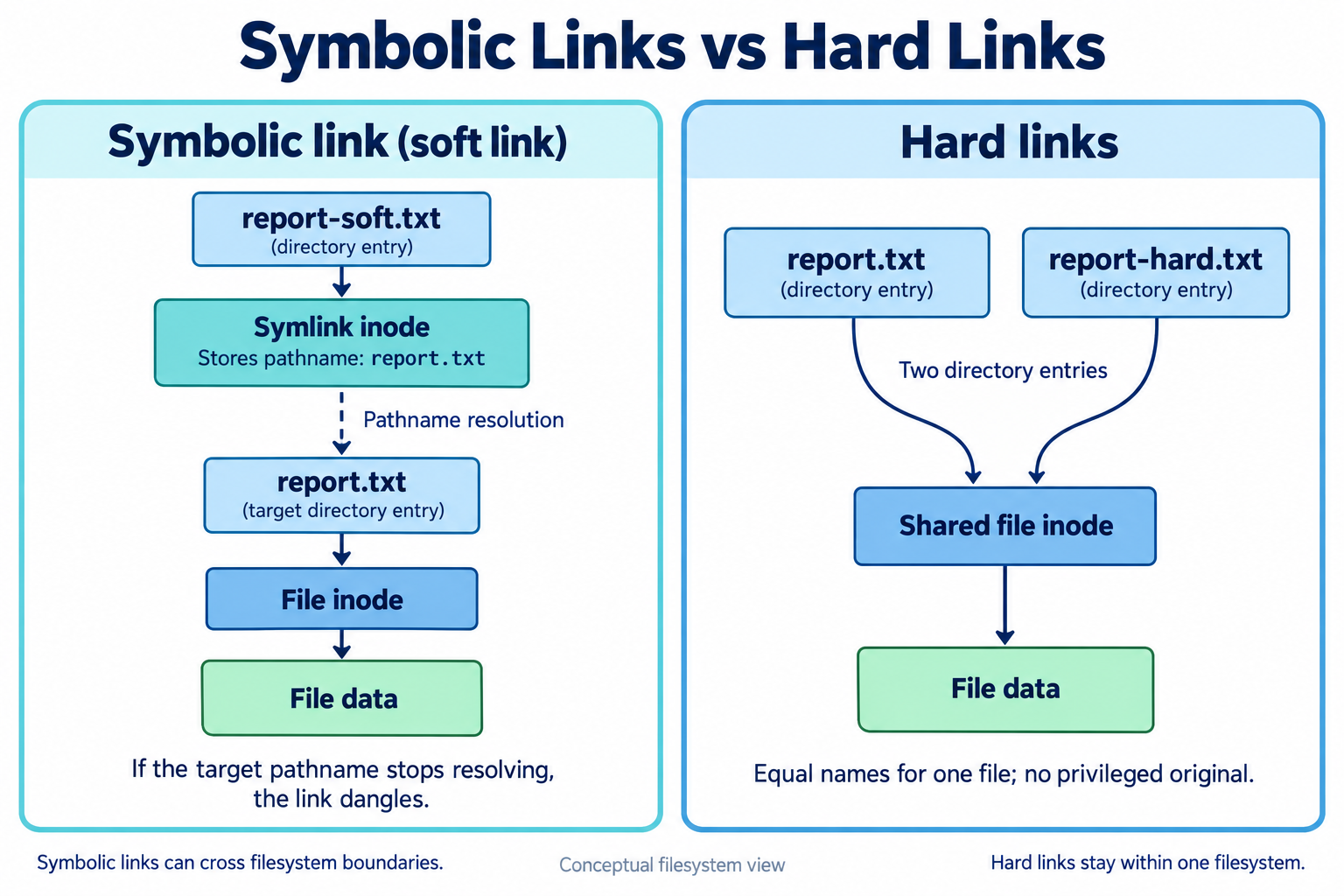
In the left panel, report-soft.txt identifies a symbolic link whose stored pathname is report.txt. Following that pathname reaches the target directory entry and its file inode. If the target pathname no longer resolves, the symbolic link dangles. The diagram shows the logical relationship, not the physical storage layout of a particular filesystem.
In the right panel, report.txt and report-hard.txt are equal directory entries pointing to one shared file inode and its data. Neither name has privileged original status. Hard links remain within one filesystem, while symbolic links can resolve across filesystem boundaries.
Choose the Relationship You Need
| Choice | Relationship | Typical purpose |
|---|---|---|
| Independent copy | Separate file contents that can diverge. | A draft or working version to edit independently. |
| Hard link | Another name for the same file within one filesystem. | Shared file content accessible under multiple names. |
| Symbolic link | A separate object storing a target pathname. | A convenient path to a file or directory, potentially across filesystems. |
Use the comparison to ask what should happen when someone edits or removes an entry. If the intended contents must be independent, a link is the wrong substitute for a copy. If the target is a directory or lies on another filesystem, a hard link is not the ordinary solution. If a pathname may change, consider how a symbolic link's stored target will resolve afterward.
Shared Content Does Not Mean Automatic Version Control
Links can reduce the need for several independent copies of the same document. That does not make them a synchronization service or a collaboration system. They do not resolve concurrent edits, keep an edit history, or protect the shared file from unintended changes.
There is also an important qualification to the statement that editing either hard-link name changes both. That is true for writes to the existing shared file. Some editors and tools save by creating a replacement file and changing one directory entry to refer to it. The other hard-link name may then continue to refer to the old inode.
For this reason, understand the saving behavior of the tools involved before relying on hard links to keep two working paths permanently aligned. The filesystem relationship is precise, but an application can replace a name rather than modify the object it previously identified.
Symbolic links have their own distinction: writing through a link and replacing the link object are different actions. A program may follow the target for one operation and act on the link itself for another. Learn the relevant behavior rather than treating all operations as edits to a universal master file.
Storage Savings Have Limits
A hard link to a large regular file avoids allocating another full copy of that file's contents. This can be valuable when several names need to refer to the same data. However, directory entries and filesystem bookkeeping still require storage. Symbolic links also need storage for their metadata and target pathname.
Describe this as avoiding content duplication, not zero-cost storage. Links do not automatically discover and deduplicate unrelated files whose contents happen to match. Creating a hard link establishes a specific relationship to an existing file; it is not a general storage-compression process.
A hard link is not an independent backup. In-place damage to the shared file affects access through every hard-link name. A symbolic link is likewise not a backup of the target contents, and can become unusable when its target path disappears. Keep independent recovery requirements separate from convenient naming.
Convenient Paths and Stable Names
A symbolic link can make a deeply nested project directory easier to reach. Instead of repeatedly typing the full path, you can use a short name located where you normally work. The target remains in its original location, and the link provides another route to it.
A link to an executable can also provide a convenient command name. For the shell to find that name without an explicit path, the containing directory must already be included in PATH. The target must still be accessible and executable. Creating a symlink does not automatically change PATH or bypass execution permissions.
Software installations sometimes use a stable symbolic-link name to select a particular release directory. This separates the path users or configuration files refer to from the release currently selected. The concept can simplify organization, but changing a link alone does not guarantee a zero-downtime upgrade.
Atomic replacement, application processes, configuration, and resource compatibility are separate deployment concerns. In particular, a command such as ln -sfn should not be advertised as a universal atomic switching mechanism. This lesson introduces the naming benefit without prescribing changes to system commands or live services.
Some shared-library installations also use symbolic links in version-naming schemes. The exact names and loader behavior vary across systems. A generic library name does not imply that every machine automatically selects the latest patch release through one universal link chain.
Cross-Filesystem References Still Depend on the Environment
A symbolic link can point toward a project stored on another mounted filesystem. That is useful for organizing access, but the referenced storage must remain available. A path that works while a mount is present may fail when that mount is absent or appears at a different location.
Moving live logs or database directories and replacing them with symlinks is not a simple consequence of this feature. Services may impose their own requirements, and permissions, mount availability, and security policy can affect the result. Use ordinary learner-owned files to understand links before considering application-specific storage changes.
Similarly, sharing a link with another user does not guarantee that the other user can reach the target. Directory search permissions and target access controls still apply. A permission failure and a dangling pathname are different problems, even when both prevent opening the file.
Review Before Creating a Link
State the desired relationship first. An independent copy is appropriate when you want separate contents. A hard link provides an equal-status name for the same regular file on one filesystem. A symbolic link stores a pathname and can conveniently refer to files or directories across filesystem boundaries.
Then consider the target's lifetime and location. A hard link survives removal of another hard-link name, while a symbolic link depends on pathname resolution. Neither choice supplies version history or independent recovery, and neither grants additional permissions.
The GNU ln documentation and your installed man ln describe creation options in more detail. The next lesson moves from these concepts to creating a link, so you can connect the command syntax with the relationship it establishes.